

Okay, this is where perhaps a section of the readers will diverge. I will say that there are advantages to each of the three approaches (CLI, UI, SDK) and that you should consider all of them for thorough understanding of BigQuery. But, usually, one will suffice for you use case. As I mentioned in my previous article these are just a drop in the bucket, and the approach mostly comes down to your personal preference.
The crux of the CLI commands for BigQuery is the BigQuery command line tool bq which is used to execute BogQuery commands from the command line. Another big piece of this is the Cloud Shell environment in GCP which gives you a terminal with the command line tools pre-installed in the GCP UI. So let’s dive into the tool and a few simple operations we can do with it.
The bq CLI tool
The bq command line tool is part of the gcloud set of command line tools. Why is it not the same starting command as the rest of Google Cloud? No clue. But it makes the specific documentation for BigQuery easy to look for. You can find the reference page here.
Installing the tool is a matter of finding a way to install gcloud on your favorite command line. But, the Cloud Shell in GCP comes pre-installed with these tools and pre-configured with the project that you are using. Quite convenient. So that is where we are going to start.

Basic Commands
We’ll take a look at a few basic commands to get you started. Not much else, just a few commands.
Read all datasets
The following command reads and lists out the BigQuery datasets:
bq ls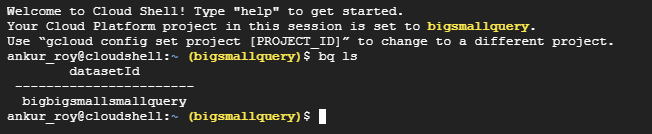
And there is the BigQuery dataset we created in the last blog. Now, lets create one for this blog.
Create a dataset
Now, we will use the CLI tool to create a new dataset:
bq --location=US mk -d \
    --description "From the command line." \
    bigbigsmallsmallqueryquery
Yes, I know my naming convention is silly, but it entertains me. And you get this:

Now for the final basic act, we’re going to import some CSV data into the dataset.
Import data
This will import data from a file into a BigQuery table of your choice in a dataset. For example:
bq insert bigbigsmallsmallqueryquery.<TABLE_NAME> <FILE_NAME>.csvThis will create a table of whatever you name it with whatever the name of the CSV you just inserted in there is. But make sure, its an actual CSV.
Conclusion
The CLI tool is pretty neat. And you can pretty much do all of the stuff you want in BigQuery, so if you would like to deep dive into it yourself, I’d say the documentation is quite thorough. The next blog will involve the use of SDKs for the same function.